Firesheep Makes Facebook Hacking Easy
Recently a new firefox addon Firesheep have been a cause of thousands of email accounts, As reported by techcurnch, Firesheep has been downloaded more than 104,000 times in roughly last 24 hours, With Firesheep the hacker can control any account without even knowing the username and password of the desired account, As Facebook is worlds most popular Social Networking website, therefore it has been the major victim of it, Firesheep uses Http Session hijacking attack to gain unauthorized access to a Facebook or any other account
What is Session Hijacking?
In a Http session hijacking attack an attacker steals victims cookies, Cookies stores all the necessary Information about one’s account , using this information you can hack anybody’s account and change his password. If you get the Cookies of the Victim you can Hack any account the Victim is Logged into i.e. you can hack Facebook Google, Yahoo, Orkut, Flickr etc or any other email account
How can a Hacker use Firesheep to Hack a Facebook or any other account?
Now I will tell you how can a hacker use firesheep to hack a facebook or any other account, You will need the following things:
* Public wifi access
* winpcap
* Firesheep
Method
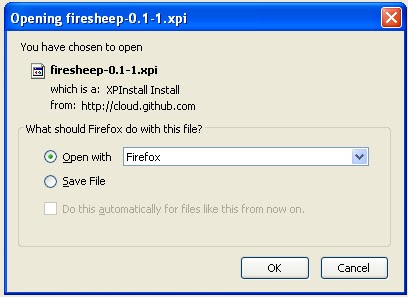
1. First of all download "Firesheep" from the above link and use the "openwith" option in the firefox browser
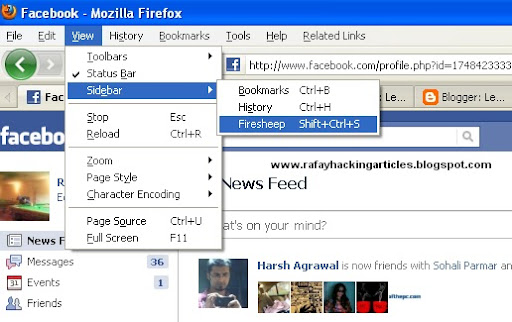
2. Once you have installed firesheep on firefox web browser, Click on view at the top, then goto sidebar and click on Firesheep
3. Now click on the top left button "Start capturing" and it will start to capture the session cookies of people in your wifi network, This will show you the list of those people whose cookies are captured and have visited unsecured website known to firesheep, Double click on the photo and you will be logged in instantly

1. First of all download "Firesheep" from the above link and use the "openwith" option in the firefox browser
2. Once you have installed firesheep on firefox web browser, Click on view at the top, then goto sidebar and click on Firesheep
3. Now click on the top left button "Start capturing" and it will start to capture the session cookies of people in your wifi network, This will show you the list of those people whose cookies are captured and have visited unsecured website known to firesheep, Double click on the photo and you will be logged in instantly
i hope u all vll lyk dis,comments vll b highly appreciated
Comments
Post a Comment